SAP Integration Guide
Sync shipments, orders, and billing data between FTM and SAP.
Overview
SAP is a widely used enterprise ERP system for managing orders, customers, and financial processes.
By integrating SAP with FTM, logistics and finance teams can keep shipment execution and ERP records aligned without manual re-entry.
With the SAP integration in FTM, you can:
- Sync shipment details to SAP
- Match customers and item records automatically
- Update ERP orders with shipment status and charges
- Receive ERP updates back in FTM
- Reduce duplicate data entry between systems
This guide explains how SAP is used inside FTM from a day-to-day user perspective.
SAP Workflow in Freight Transportation Manager (FTM)
The SAP integration follows a structured ERP sync flow:
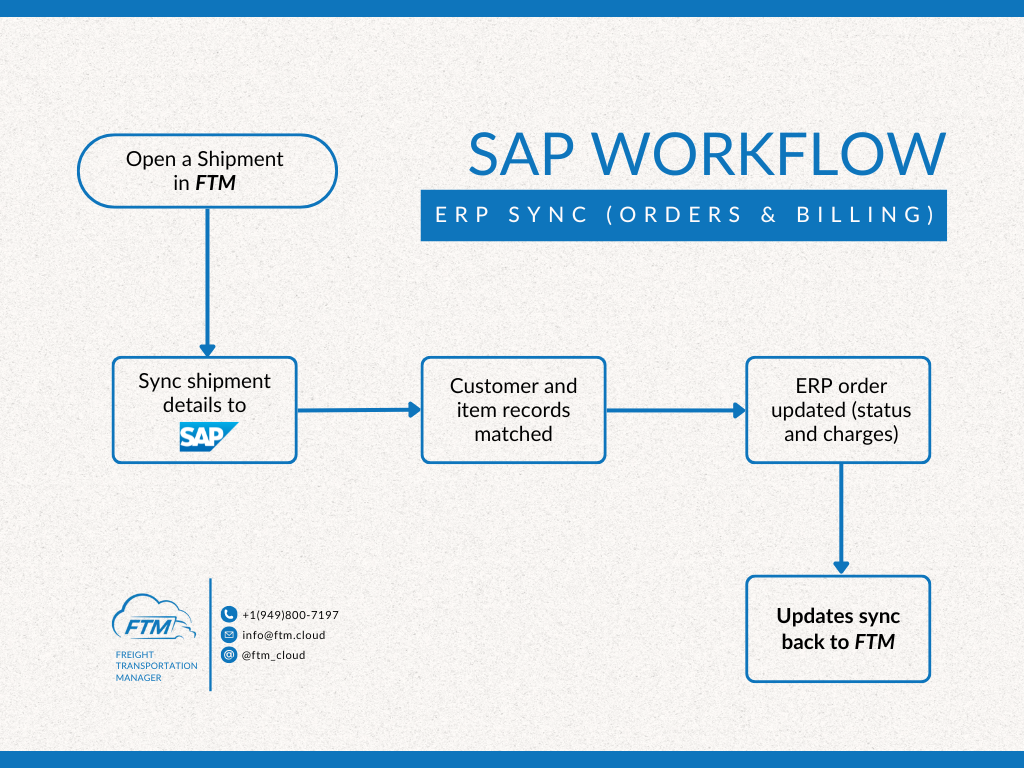
- Shipment is managed in FTM
- Shipment data is sent to SAP
- Customer and item records are matched
- ERP order is updated
- Status and billing updates sync back to FTM
SAP Usage
Where you’ll use SAP in FTM
You’ll use the SAP integration from within the Shipment view in FTM.
There is no need to log into SAP for routine shipment updates once the integration is active.
A) Open a shipment in FTM
Start by opening an existing shipment or load in FTM that is ready to sync with ERP.
This shipment becomes the source of truth for execution details.
B) Sync shipment details to SAP
From the shipment view, FTM sends shipment details to SAP.
This includes information such as:
- Customer
- Items or services
- Charges
- Shipment status
C) Match customer and item records
SAP matches the incoming shipment data to existing customer and item records.
This ensures data consistency between logistics and ERP systems.
D) Update ERP order
Once matched, the ERP order in SAP is updated with:
- Shipment status
- Charges and billing details
No manual order updates are required.
E) Receive updates back in FTM
Any relevant ERP updates are synced back into FTM.
This keeps shipment and financial status aligned across systems.
Notes
- SAP remains the ERP system of record
- FTM remains the execution system
- The integration focuses on order and billing alignment, not dispatch or routing