The FTM Highway Load Lock integration brings freight fraud prevention directly into Salesforce. Because rate confirmation fraud is one of the most costly risks brokers face today, this integration ensures that every rate con sent from FTM is delivered securely to a verified carrier contact, with a full audit trail of who accessed it, where, and when.
Send Rate Confirmations
That Only Reach the Right Hands.
The FTM Highway Load Lock integration secures your rate confirmation delivery directly from Salesforce. Every rate con is delivered only to a verified carrier contact. Furthermore, Highway logs exactly who accessed it, from where, and how, so you have a complete audit trail throughout the life of every load.
Salesforce-Native · Powered by Highway Load Lock · Verified Carrier Delivery
Who the FTM Highway Load Lock Integration Is For
This integration is primarily built for brokers who handle high volumes of rate confirmations and need to protect their transactions from load phishing and identity fraud.
Freight Brokers
Because rate confirmation fraud targets brokers directly, Load Lock ensures every rate con sent from FTM reaches a verified carrier contact. As a result, bad actors cannot intercept your documents and steal your loads.
Operations Managers
In addition to protecting individual transactions, the audit trail Load Lock creates gives operations teams full visibility into who accessed each rate confirmation, from where, and when.
Compliance and Risk Teams
Highway Load Lock provides a breadcrumb trail of document access events for every rate con sent through FTM. Consequently, your team has the documentation needed to investigate and respond to any disputed transaction.
What the FTM Highway Load Lock Integration Does
Load Lock works alongside Highway’s identity verification engine to protect your outbound rate confirmation communications throughout the life of every load.
Secure rate confirmation delivery
Instead of sending a rate con directly by email, FTM routes it through Highway Load Lock. Because of this, the document is delivered only after the recipient’s identity is verified by Highway.
Verified carrier contact only
Highway maintains validated dispatch contact information for over 30,000 carriers. Therefore, your rate confirmation reaches a real, verified contact rather than a fraudster posing as one.
Full access audit trail
Highway generates a breadcrumb trail for every rate con: who accessed the document, where they accessed it from, and how. Furthermore, this data is returned to FTM so your records reflect the full delivery history.
Load phishing prevention
Load phishing is a common fraud tactic where bad actors intercept rate confirmations and attempt to steal loads. Highway Load Lock eliminates this risk by ensuring the document never reaches unverified recipients.
Carrier identity at its core
Highway’s carrier identity engine sits beneath Load Lock. In addition to delivery verification, the platform validates equipment types on over 2.5 million trailers, so you know exactly who you are working with.
Native to Salesforce
Because the integration runs natively inside FTM, there is no middleware to maintain. Rate cons are sent through Load Lock directly from the Load record, without switching to another platform or tool.
The FTM Highway Load Lock Integration Workflow
From load creation in FTM to verified rate confirmation delivery, Highway Load Lock protects each transaction step by step.
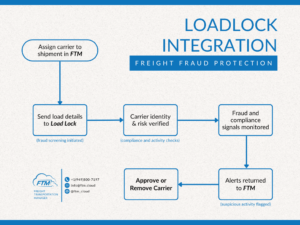 FTM Highway Load Lock integration workflow: secure rate confirmation delivery from FTM Salesforce to verified carrier contacts
How to Activate the Highway Load Lock Integration
Approximately 15 to 30 minutes. Requires your Highway account credentials and a Salesforce admin.
Get your Highway API credentials
First, log into your Highway account and retrieve your API credentials. If you are unsure whether your plan includes Load Lock and API access, contact Highway directly or email [email protected] and we will help confirm your access level.
Send credentials to the FTM team
Next, email [email protected] with your Highway API credentials. The FTM team will then configure a Salesforce Named Credential and confirm when the connection is active. Credentials are stored securely and never appear in code, records, or logs.
Test in sandbox first
Before going live, the FTM team activates the integration in your Salesforce sandbox environment. Open a test Load record, send a rate confirmation through Load Lock, and verify that the document is delivered securely and that the access trail is returned to FTM correctly.
Go live
Finally, once sandbox testing passes, the FTM team activates the production connection. The Send via Load Lock button becomes available on all Load records for users with the appropriate Salesforce profile. From that point forward, every rate confirmation sent from FTM is protected by Highway.
Frequently Asked Questions
What is Highway Load Lock?
Highway Load Lock is a secure rate confirmation delivery product from Highway. It is part of Highway’s broader anti-fraud platform and works alongside the Highway for Outlook Plugin. Rather than sending a rate con directly by email, Load Lock delivers it only to a verified carrier contact, and records who accessed it, from where, and how. As a result, brokers are protected from load phishing and identity fraud throughout the life of every load.
How does Load Lock protect against freight fraud?
Load phishing is a tactic where fraudsters intercept rate confirmations and attempt to steal loads by posing as legitimate carriers. Because Highway verifies the recipient’s identity before delivering the document, bad actors cannot access the rate con even if they obtain the delivery link. Furthermore, the access audit trail means any suspicious access attempt is recorded and visible to your team.
Does this integration work with the Highway for Outlook Plugin?
Yes. Highway Load Lock and the Highway for Outlook Plugin are complementary products. The Outlook Plugin verifies inbound carrier communications, while Load Lock secures your outbound rate confirmation delivery. Together, they protect brokers throughout the full communication lifecycle of a load. However, the Outlook Plugin is a separate configuration outside of FTM.
Where are my Highway credentials stored in Salesforce?
In a Salesforce Named Credential. Credentials are never stored in Apex code, records, or logs and are not visible to standard Salesforce users. Only system administrators can access or update the credential configuration.
What is the access audit trail and where does it appear in FTM?
When a rate confirmation is delivered through Load Lock, Highway records each access event: who opened the document, the location it was accessed from, and the method of access. This information is then returned to FTM and stored on the associated Load record so your team has a complete delivery history without leaving Salesforce.
Does this replace sending rate confirmations by email?
Load Lock augments rather than replaces your existing rate confirmation process. Instead of attaching a rate con directly to an email, you send it through Highway’s secure delivery system. The carrier receives a verified, access-controlled link. As a result, the document is just as easy to receive for legitimate carriers, but significantly harder to intercept for bad actors.
How long does activation take?
For existing FTM customers, activation typically takes one business day once Highway API credentials are provided. First, the FTM team configures the Named Credential and runs sandbox tests. Then, once everything is confirmed, production is activated. Email [email protected] to begin.
See the FTM Highway Load Lock integration live
Book a 15-minute demo and we’ll walk through secure rate confirmation delivery in a live org.
Book a DemoReady to protect your rate cons?
Get help activating the integration in your org or ask about setup requirements.
Email Support⚙ Developer & Admin Reference For Salesforce Admins & Developers
Prerequisites
- Active Highway account with Load Lock enabled
- Highway API credentials (API key or OAuth token) VERIFY auth method with Highway
- Salesforce FTM org (production or sandbox) with System Administrator access
- Named Credential configured:
Highway_LoadLockwith correct base URL and auth header VERIFY credential name - Each Load record must have a rate confirmation document or reference attached before sending through Load Lock
- Carrier contact on the Load record must have a valid, populated email address
Authentication
The FTM Highway Load Lock integration uses a Salesforce Named Credential for all outbound calls to the Highway API. This ensures that credentials never appear in Apex code, records, UI elements, or logs.
- Named Credential:
Highway_LoadLockVERIFY exact name with dev team - Authentication type: API Key header or Bearer Token VERIFY with Highway API docs
- Base URL: Highway API endpoint for Load Lock delivery Do NOT publish the real URL publicly
Apex Component Reference
The following components reflect the standard FTM integration architecture. Confirm exact class and Visualforce page names with your development team before publishing.
| Component | Type | Purpose |
|---|---|---|
HighwayLoadLockService | Apex Class VERIFY name | Core service class. Handles the outbound HTTP callout to the Highway Load Lock API, including payload construction, authentication header injection, and response parsing. Returns the delivery tracking ID and access log URL. |
HighwayLoadLockController | Apex Controller VERIFY name | Visualforce or LWC controller. Triggered by the Send via Load Lock button on the Load record. Calls the service class, handles success and error messaging, and writes the Load Lock delivery reference back to the FTM record. |
HighwayLoadLockAudit | Apex Class VERIFY name | Retrieves the access audit trail from Highway for a given delivery ID and stores the access events on the FTM Load record. Can be called on demand or scheduled to poll periodically. |
| VF / LWC: Load record page | UI Component VERIFY | Button: Send via Load Lock. Displays delivery confirmation and access trail on the Load record. Shows carrier name, delivery status, and last access timestamp. |
Field Mapping: FTM Load to Highway Load Lock (Outbound)
| FTM Field | Highway API Field | Notes |
|---|---|---|
FreightTM__Load_Number__c | referenceNumber | Required VERIFY field name |
| Rate confirmation document / attachment ID | documentId or documentUrl | Required VERIFY how Highway accepts the document |
| Carrier contact email on Load | recipientEmail | Required Highway uses this to match against verified contacts |
| Carrier name on Load | carrierName | Required Used for identity matching |
FreightTM__Pickup_Date__c | pickupDate | Optional Included in the document metadata |
FreightTM__Pickup_City__c + FreightTM__Pickup_State__c | origin | Optional Included in the document metadata |
FreightTM__Delivery_City__c + FreightTM__Delivery_State__c | destination | Optional Included in the document metadata |
Field Mapping: Highway Load Lock Response to FTM (Inbound)
| Highway Response Field | FTM Field | Notes |
|---|---|---|
deliveryId | LoadLock_Delivery_ID__c | Unique delivery reference stored on the Load record VERIFY custom field exists or create it |
deliveryStatus | LoadLock_Status__c | Status values: Pending, Delivered, Accessed, Failed VERIFY status values with Highway |
accessedBy | LoadLock_Accessed_By__c | Name or identifier of the contact who opened the document |
accessedAt | LoadLock_Accessed_At__c | Timestamp of first access |
accessLocation | LoadLock_Access_Location__c | Geographic location of the access event |
verifiedContact | LoadLock_Verified_Contact__c | Boolean: whether the recipient matched a Highway-verified contact |
Error Handling and Troubleshooting
| Error / Symptom | Most Likely Cause | Fix |
|---|---|---|
| Authentication error on send | Named Credential expired or incorrectly configured | Verify Highway_LoadLock Named Credential has correct API key or token. Re-authenticate if necessary. |
| Carrier not verified warning | Carrier contact does not match a Highway-verified contact | Verify the carrier email on the Load record is accurate. The carrier may not yet be in Highway’s verified network. |
| Document field missing | No rate confirmation attached to the Load record | Attach the rate confirmation document to the Load record before attempting to send via Load Lock. |
| HTTP 401 | Invalid or expired API credentials | Refresh the Highway API token. Update the Named Credential accordingly. |
| HTTP 422 | Invalid or missing required fields in the payload | Check that carrier email, document reference, and load number are all populated on the record. VERIFY required fields with Highway API docs |
| Delivery ID not written back to FTM | Response parsing failure in the Apex class | Check debug logs for HighwayLoadLockService. Verify the response field names match the Highway API schema. |
Testing Checklist (Sandbox)
Before you begin, confirm:
- Named Credential
Highway_LoadLockis configured with valid credentials - Custom fields exist on the Load object:
LoadLock_Delivery_ID__c,LoadLock_Status__c,LoadLock_Accessed_By__c,LoadLock_Accessed_At__cVERIFY or create these fields - At least one test Load record has a rate confirmation document attached and a carrier contact email populated
- Highway sandbox environment is available for testing VERIFY with Highway
Outbound delivery tests:
- Open a test Load record. Click the Send via Load Lock button.
- Confirm a success message appears and the Load Lock Delivery ID is written back to the Load record.
- Verify the rate confirmation is accessible through Highway with the correct document and metadata.
- Test a Load record with a missing carrier email and confirm the validation error appears correctly.
Inbound audit trail tests:
- Simulate a document access event from the Highway side or using a test carrier contact.
- Confirm the access event data (accessed by, timestamp, location) is returned to the FTM Load record.
- Verify the Verified Contact field reflects the correct Highway verification status.
