Shippers preparing for a TMS demo often spend too much time building a feature checklist and too little time defining the transportation decisions the system must support.
On this page
As a result, a polished presentation can easily control the conversation. The vendor shows a clean dashboard, creates an ideal shipment, highlights a few automation rules, and finishes before anyone tests what happens when the data is incomplete, the carrier rejects the tender, or the delivery misses its appointment.
By contrast, a useful demo works differently.
Therefore, your team should arrive with a real operating scenario, representative data, known exceptions, integration questions, and a clear definition of success. The vendor should then demonstrate how the system handles that workflow from order intake through execution, visibility, documents, freight settlement, and reporting.
The purpose of a TMS demo is not to discover how many features the product has. It is to test whether the system can run your transportation operation without creating new workarounds.
Shippers beginning a broader selection process should also review the questions to ask before choosing a TMS before scheduling vendor sessions.
A TMS Demo Should Be a Workflow Test, Not a Product Tour
A vendor-led tour usually follows the product’s strongest path.
Your evaluation should follow the shipper’s actual path.
Start with an order entering from the ERP or customer system. Then require the vendor to plan the shipment, apply rates, select or tender to a carrier, manage pickup, respond to an exception, capture delivery proof, reconcile charges, and produce the report leadership needs.
As a result, that sequence exposes gaps a feature checklist can miss.
For example, a platform may offer shipment tracking while still requiring users to leave the system to resolve an exception. Another product may show powerful freight optimization but struggle with the customer-specific approval rules your team applies before a load can move.
Consequently, when evaluating TMS for shippers, focus on the handoffs between functions. Those transitions are where duplicate entry, information latency, and ownership disputes usually appear. FTM’s shipper workflows connect orders, shipments, carrier collaboration, visibility, documentation, and reporting inside Salesforce.
Prepare the Operating Evidence Before the Demo
A productive demo begins several days before the meeting.
Document the current workflow
Map the steps your team follows today, including the informal ones.
Capture:
- How transportation orders enter the operation
- Who reviews and corrects the data
- How mode, carrier, and service are selected
- Where rates come from
- How tenders are issued
- Which events trigger customer communication
- How accessorials are approved
- When finance can begin freight audit or billing
- Which reports leadership relies on
However, do not clean up the process for the vendor. The inefficient parts are exactly what the demo needs to test.
Bring representative shipment data
A generic Chicago-to-Dallas truckload proves very little.
Select two or three examples that represent your actual complexity. Include realistic origins, destinations, products, carriers, rate structures, appointments, stops, documents, and service requirements.
One scenario should be routine. Another should contain a known operational difficulty, such as:
- A multi-stop shipment
- A carrier rejection
- An appointment change
- A partial delivery
- A missing POD
- A detention charge
- An incorrect carrier invoice
- A customer-specific notification rule
Therefore, the vendor does not necessarily need confidential production data. An anonymized but structurally accurate shipment is enough.
Define measurable outcomes
“Better visibility” is not a useful acceptance criterion.
Translate the objective into something the team can observe during the demo:
- Can a planner create and tender the shipment without retyping ERP data?
- Does the system identify a late pickup before customer service receives a call?
- Can finance trace an accessorial charge to the approval and document that created it?
- Can a customer see the shipment without accessing the shipper’s internal workspace?
- Does a corrected appointment update every downstream user and workflow?
These questions turn the demonstration into evidence.
Bring the Right People Into the Room
Transportation software affects more than the transportation department.
A strong evaluation team usually includes representatives from:
- Transportation planning
- Dispatch or execution
- Carrier management
- Customer service
- Finance or freight audit
- IT and integration
- Security or compliance
- Procurement
- Executive sponsorship
Not every stakeholder needs to attend the entire session. Still, each function should own a part of the test script.
Operations should test whether the workflow is usable under time pressure. Finance needs to follow rates, accessorials, accruals, invoices, and settlement. IT should test the integration architecture rather than accepting a slide that says “API available.”
Customer service should see exactly what information becomes visible and when.
A TMS decision made only by transportation can create years of downstream work for everyone else.
Give the Vendor a Real Shipper Scenario
Send the use case before the meeting and ask the vendor to demonstrate it live.
A practical script might begin with this situation:
A purchase order creates a two-stop outbound shipment. The first carrier rejects the tender. A second carrier accepts, but its ETA later moves outside the delivery appointment. The customer needs an update, the consignee approves a revised window, and detention occurs during unloading. After delivery, the driver submits a POD and the carrier invoice includes an unexpected charge.
Ask the vendor to show how the TMS handles each step.
Watch closely for where the presenter changes systems, skips data entry, explains that a feature would require configuration, or substitutes a slide for a live workflow.
Those moments are not automatic disqualifiers. They are implementation requirements that need to be documented.
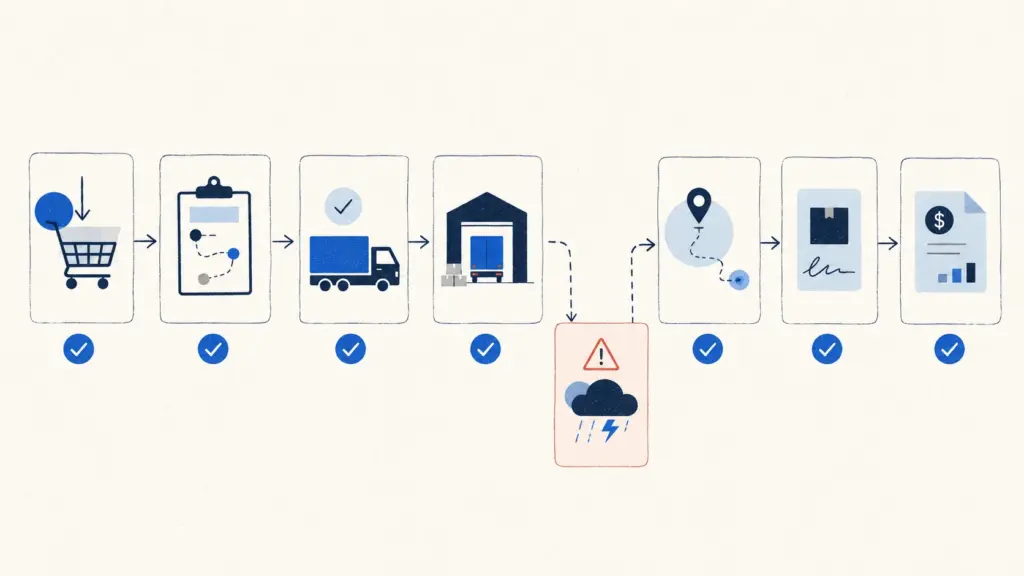
What Shippers Should Test During a TMS Demo
A serious TMS evaluation should test both the visible workflow and the data behind it.
Order intake and data quality
Begin at the point where transportation demand enters the system.
Ask the vendor to import or create an order using your field structure. Then change an address, quantity, requested date, or service requirement.
Verify whether the system:
- Detects missing required data
- Prevents duplicate orders
- Preserves the source-system identifier
- Separates planned from executed information
- Shows who changed a critical field
- Updates dependent shipment records correctly
Document automation should also be tested with a real sample. FTM’s AutoFill document workflow can read freight documents, match them to transportation records, draft operational and financial data, and hold the result for human approval before writing it to Salesforce.
Planning, consolidation, and rating
Do not ask the vendor to show the “optimization screen.” Give the system a decision to make.
Test whether it can compare feasible modes, consolidate orders, honor delivery windows, apply equipment constraints, and explain why it selected a plan.
Then alter one variable.
Change the pickup date, carrier availability, stop sequence, capacity, or service commitment. The new plan should update without requiring users to rebuild the shipment manually.
Rate testing should include contracted tariffs, spot quotes, fuel, minimums, accessorials, and customer-specific rules where applicable.
Carrier tendering and collaboration
Require the vendor to tender the shipment and simulate a rejection.
Evaluate the next step:
- Does the workflow automatically follow the approved tender sequence?
- Can planners see the response history?
- Are rates and service commitments preserved?
- Can users compare alternate carriers without opening another tool?
- Does the system distinguish approved carriers from unqualified capacity?
A successful tender is only the happy path. The rejection process shows whether the platform can support execution under pressure.
Shipment execution and visibility
Create an ETA risk during the live demo.
The system should identify which shipment is affected, show the evidence, connect the risk to the appointment or customer promise, and make the next action clear.
FTM’s Dispatch Console brings load status, driver and carrier updates, documents, exceptions, customer activity, and financial signals into one Salesforce workspace.
Avoid accepting a colored dot as proof of visibility. A shipper needs to know what users can do after the dot turns red.
Customer communication
Ask the vendor to show what the customer sees before, during, and after the exception.
A useful portal should apply account-specific access, show the correct shipments and documents, and update from the operating record without requiring someone to publish the same information twice.
The FTM Customer Portal connects customer visibility to the same transportation record used by operations rather than creating a separate status system.
Documents and proof
Upload a BOL, delivery receipt, POD, or carrier invoice.
Test document matching, version history, permissions, exception handling, and downstream use. A POD should not simply sit in a folder. It should change the delivery, billing, or settlement workflow where appropriate.
Ask what happens when the document is unreadable, attached to the wrong shipment, or missing a required signature.
Freight audit, settlement, and reporting
Follow the shipment into finance.
Compare the planned rate, tendered rate, actual carrier charge, accessorials, accrual, invoice status, and final transportation cost.
FTM’s Billing and Reporting workflow connects tariff-based pricing, invoices, carrier payments, accounting integrations, and shipment-level financial history to the load record.
Finally, change one charge and refresh the report. Leadership should not have to wait for a nightly export to see the financial impact.
| Demo Test | Evidence to Request | Warning Sign |
|---|---|---|
| Order and shipment creation | Create a shipment from representative order data, then correct a field and show every dependent update. | The presenter retypes information, skips the correction, or explains the process only with slides. |
| Planning and rating | Compare feasible plans, apply contracted rates, and explain why the selected option meets the service rules. | The recommendation cannot be explained or relies on data that would not exist in production. |
| Tender rejection | Reject the first tender and show the approved backup sequence, response history, and rate impact. | Users must restart the sourcing process or leave the TMS to find an alternative. |
| Execution exception | Create an ETA or appointment risk and demonstrate detection, action, communication, and escalation. | The system displays an alert but provides no connected recovery workflow. |
| Customer visibility | Show exactly what a customer account can see before and after the exception. | Updates require manual publishing or expose unrelated customers, documents, or financial data. |
| Documents and charges | Upload a POD or carrier invoice, match it to the shipment, and route an unexpected charge for review. | The document remains disconnected from execution, approval, billing, or settlement. |
| Security and auditability | Change a critical field under two user roles and show permissions, history, and approval records. | Access is demonstrated only through an administrator account or audit capability is assumed. |
| Reporting | Change an operational or financial value and show how the relevant report updates. | Reporting requires an export, manual reconciliation, or a separately maintained data model. |
Test the Exception Path Before the Happy Path
Most demos make transportation look predictable.
Production transportation is not.
Ask the vendor to interrupt the workflow with an exception that affects several teams. A missed appointment is useful because it touches operations, carrier communication, customer service, financial exposure, and reporting.
The system should answer five questions:
- What changed?
- How was the issue detected?
- Which shipments, orders, customers, or costs are affected?
- What action can the user take now?
- How will the outcome be recorded?
A dashboard that identifies the problem but cannot support the response leaves the hardest work outside the TMS.
Also test what happens when the first recovery action fails. Exception management is rarely a single alert followed by a perfect resolution.
Integration Questions That Expose Implementation Risk
“Can you integrate with our ERP?” is too broad.
Almost every vendor can answer yes. The useful questions concern ownership, timing, and failure recovery.
Ask the vendor to explain:
- Which system owns each master record
- Whether the integration is prebuilt, configured, or custom
- What data moves in each direction
- Whether updates occur in real time, on a schedule, or manually
- How failed transactions are identified and retried
- Who monitors the integration after launch
- How field mappings are changed
- Whether a sandbox or test environment is available
- What happens when either system changes its API
- Which implementation and ongoing costs are excluded from licensing
Review the vendor’s transportation integration options before the meeting and send a list of systems the demo must address. FTM currently documents integration paths across ERP, accounting, telematics, visibility, compliance, mapping, and load-board categories.
An integration diagram is helpful. A live error and recovery test is better.
Test Security, Permissions, and Auditability
Security questions should not wait until contract review.
In July 2026, NIST finalized a supplier due-diligence guide that recommends reasonable research and investigative rigor before organizations enter agreements with technology suppliers. While the guide focuses on cybersecurity supply-chain risk, its principle applies directly to TMS selection: supplier risk should be evaluated before the platform becomes operational infrastructure. Link to the NIST Cybersecurity Supply Chain Risk Management Due Diligence Guide.
During the demo, ask the vendor to create users with different roles.
A planner, finance user, customer, carrier contact, and administrator should not see or change the same information.
Test:
- Field-level access
- Customer and business-unit separation
- Approval authority
- Record ownership
- Sensitive financial data
- Document access
- User deactivation
- Configuration history
- Critical field changes
- Export and API permissions
For Salesforce-based products, Salesforce documents security capabilities that include auditing, event monitoring, field-level controls, and Field Audit Trail, although exact availability depends on edition and licensing. Ask the vendor to demonstrate which controls are included in the proposed environment rather than assuming every platform feature is part of the TMS package. See the current Salesforce Security Guide.
Questions That Reveal the Real Cost of the TMS
Subscription price is only one component of the decision.
Ask for a five-year operating view that includes:
- User and platform licenses
- Implementation
- Data migration
- Integration setup
- Third-party data or visibility services
- Document or transaction volume
- Sandbox environments
- Reporting development
- Support tiers
- Training
- Workflow changes
- Custom development
- Future upgrades
Clarify what “configurable” means.
Can an administrator change a workflow, field, approval rule, or report through documented settings? Does the vendor need to write code? Will the change affect upgrades? How long does it usually take?
The demo should also distinguish available functionality from roadmap items. A planned feature should not receive the same evaluation score as software your team can test now.
Common TMS Demo Mistakes
Letting the vendor control the agenda
The vendor understands its product. Your team understands the operation.
Provide the scenario, required integrations, exceptions, and acceptance criteria in advance.
Testing only with vendor data
Perfectly structured demo data hides data-governance problems.
Use anonymized examples that reflect your actual field structure, documents, rates, and exceptions.
Treating every feature as equally important
A long checklist can reward breadth over operational fit.
Weight requirements according to service risk, financial impact, user frequency, and implementation dependency.
Excluding finance and IT
Transportation can approve a workflow that finance cannot reconcile and IT cannot support.
Both groups need defined tests, not observer status.
Accepting configuration promises without evidence
When a presenter says, “We can configure that,” record the requirement.
Ask who performs the work, how long it takes, what it costs, and whether the configuration can be shown in a follow-up session.
Score the Workflow, Not the Presentation
Evaluate each vendor immediately after the demo while the evidence is fresh.
Use weighted categories such as:
- Operational workflow fit
- Exception management
- Integration readiness
- User experience
- Reporting and financial control
- Security and governance
- Implementation risk
- Vendor support
- Total cost
- Product roadmap
Require evaluators to add evidence beside each score.
“Strong visibility” is an opinion. “The system detected the ETA risk, notified the correct account contact, and preserved the communication on the shipment record” is evidence.
Any unanswered requirement should remain open rather than receiving an assumed score.
Where FTM Fits Into a Shipper TMS Evaluation
FTM is a Salesforce-native transportation platform for shippers that connects order and shipment management, dispatch, carrier activity, customer visibility, documents, financial workflows, integrations, and reporting on shared Salesforce records.
A shipper demo can therefore follow one connected scenario through:
- The FTM shipper platform
- The broader transportation product suite
- Live execution in the Dispatch Console
- Customer access through the Customer Portal
- Document processing with FTM AutoFill
- Financial completion in Billing and Reporting
- ERP, accounting, visibility, and carrier connections through FTM Integrations
The important test is not whether each module exists.
Ask the team to show how one change to the transportation record moves through operations, customer visibility, documents, and finance without duplicate entry.
Final TMS Demo Checklist for Shippers
Before the demo
First, select one routine shipment and one exception-heavy scenario.
Then:
- Document the current workflow and its workarounds.
- Bring anonymized orders, rates, documents, and reports.
- Assign tests to operations, finance, IT, security, and customer service.
- Define measurable acceptance criteria.
- Send the scenario and integration list to the vendor.
During the demo
Next, require the vendor to complete the workflow rather than describe it.
- Start from order intake.
- Change shipment data after planning.
- Trigger a carrier rejection.
- Create an ETA or appointment exception.
- Test customer communication.
- Upload an imperfect document.
- Add an unexpected charge.
- Review permissions and audit history.
- Follow the shipment through financial reporting.
- Record every item described as configuration, customization, or roadmap.
After the demo
Finally, evaluate only what the team observed.
- Score demonstrated capabilities rather than promises.
- Separate product gaps from implementation requirements.
- Request follow-up evidence for unresolved items.
- Validate security, integration, and cost assumptions.
- Speak with references that operate comparable workflows.
- Run a sandbox or proof of concept when the risk justifies it.
Above all, a TMS demo should leave your team with fewer assumptions than it had before the meeting.
When the session ends with only a list of impressive features, the shipper has not completed an evaluation. It has watched a presentation.
Frequently Asked Questions
Bring Your Real Transportation Workflow to the Demo
FTM will walk through your orders, planning rules, carrier process, exceptions, customer visibility, documents, integrations, and financial reporting inside Salesforce.
Schedule a Shipper Workflow Demo