A freight invoicing workflow that closes within 24 hours finishes most of the billing work before the truck delivers.
On this page
Customer references already exist. The rate already matches the agreement. Accessorial rules are known. Finance knows where the invoice will go. Then, delivery confirmation and the POD become the final triggers rather than the beginning of an investigation.
For this article, “under 24 hours” means sending or posting a clean customer invoice within 24 hours of confirmed delivery. It does not mean collecting payment within 24 hours.
That distinction matters because transportation companies often measure invoice speed from the moment accounting starts working. A better metric starts when the freight delivers.
The objective is simple:
Delivered → financially complete → invoice sent within 24 hours, with humans working only the exceptions.
A 24-Hour Freight Invoicing Workflow Starts Before Delivery
If billing waits until delivery to collect the information it needs, a 24-hour target will remain difficult.
Before dispatch closes the load, the record should already contain:
- Customer billing entity
- Billing contact or delivery method
- PO and required references
- Agreed customer rate
- Fuel calculation
- Expected accessorial rules
- Origin and destination
- Relevant BOL or rate confirmation
- Accounting destination
- Customer-specific invoice requirements
Therefore, the invoice should not require someone to reconstruct the shipment afterward.
FTM’s current Billing & Reporting workflow follows this model: customer rates, carrier costs, accessorials, documents, invoices, and accounting activity stay connected to the same load record.
Explore FTM Billing & Reporting
Build billing requirements into customer setup
A customer that requires a PO, POD, cost center, BOL number, or special invoice format should not communicate that requirement separately for every load.
Instead, store those rules against the account and apply them when the load moves toward billing.
That moves validation upstream, where fixing missing information costs less.
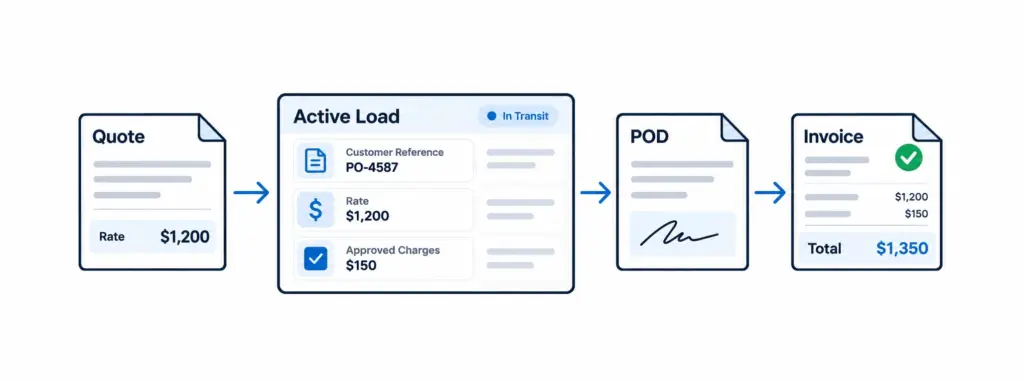
The 24-Hour Freight Invoicing Workflow
The fastest billing process uses events rather than inboxes.
Delivery to 15 minutes: capture proof immediately
The driver or carrier should submit the signed POD as part of the delivery workflow.
Do not allow POD collection to become tomorrow’s administrative task.
FTM’s Driver App, for example, lets drivers capture PODs, signatures, photos, delivery events, and exceptions directly against the Salesforce load record. Consequently, finance can access the delivery evidence without waiting for dispatch to forward an attachment.
See FTM’s Carrier & Driver App
15–60 minutes: run billing-readiness checks
Once delivery completes, automation should check:
- POD present
- Customer references complete
- Delivery status confirmed
- Customer rate confirmed
- Accessorials documented
- Required approvals complete
- Invoice recipient available
Clean loads move forward.
However, incomplete loads enter an exception queue instead of stopping the entire billing process.
1–4 hours: resolve only exceptions
Finance should not review every load equally.
Instead, give employees a queue containing only loads with missing documents, unsupported accessorials, rate differences, incomplete references, duplicate invoices, or customer-specific requirements.
This distinction creates the biggest operational change.
Routine freight flows. Unusual freight receives attention.
4–24 hours: generate, transmit, and post
After validation, the system should build the invoice from approved load data and send it through the customer’s required channel.
For motor-carrier EDI workflows, X12 maintains transaction set 210 Motor Carrier Freight Details and Invoice, which carries freight charge and invoice information between transportation trading partners. X12
Review the official X12 transportation transaction sets
Meanwhile, the accounting record should update without another person recreating the invoice.
Related FTM Workflow
Place this block here, after the four-stage workflow.
Exceptions Should Branch, Not Stop Billing
A common billing design mistake sends every load through the same manual review.
That makes a clean $2,000 shipment wait behind a disputed detention charge on another load.
Instead, create separate paths.
Straight-through path: all billing conditions pass, so the system generates and sends the invoice.
Exception path: something fails, so the system routes that load to the appropriate person.
For example, AutoFill can extract information from PODs, rate confirmations, and carrier invoices, match it to transportation records, and prepare charges or invoice data for human approval.
This is where human-in-the-loop automation works well: software handles predictable freight while employees make judgment calls.
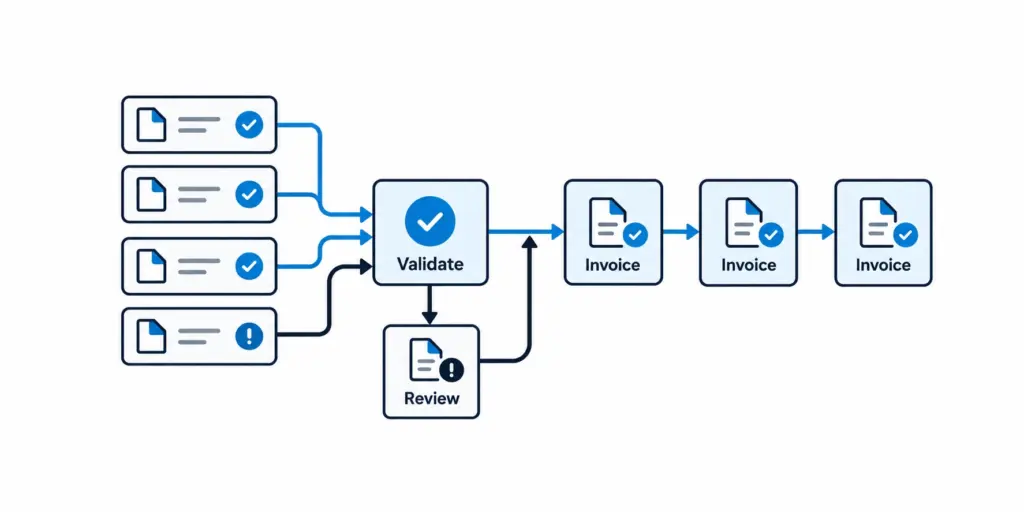
Build One Billing-Readiness Gate
A freight invoicing workflow works faster when one clear rule determines whether the load can bill.
Use a gate like this:
| Billing Check | Pass Condition | If It Fails |
|---|---|---|
| Delivery | Delivered status and timestamp confirmed | Return to operations |
| POD | Required proof attached | Request document |
| Rate | Customer charge matches approved rate | Route rate variance for review |
| Accessorials | Charges have required evidence and approval | Hold only disputed charge/load |
| References | PO, BOL, load number, or required customer fields present | Route to responsible owner |
| Accounting | Customer and financial mapping valid | Send to integration exception queue |
Soft mid-article CTA
See how FTM connects delivery, POD, charges, invoicing, and accounting: explore Billing & Reporting rather than rebuilding the transaction after the load closes. Explore Billing & Reporting
Measure Delivery-to-Invoice Time, Not Billing Activity
A team can look busy while invoices still leave slowly.
Therefore, track the actual outcome.
The most useful metrics include:
- Median delivery-to-invoice time
- Percentage invoiced within 24 hours
- Unbilled delivered loads
- Billing exception rate
- First-pass invoice acceptance
- Manual touches per invoice
- Missing-POD rate
- Accessorial exception rate
- Accounting integration failures
APQC’s current order-to-cash guidance recommends measuring performance end to end rather than relying on one finance metric. It also identifies process ownership, standardization, integrated data, automation, and better exception management as improvement levers.
For freight operations, delivery-to-invoice time deserves its own dashboard because DSO starts after the invoice exists.
Where FTM Fits Into a Sub-24-Hour Workflow
FTM connects field events and finance through the same Salesforce load record.
The Driver App can capture the POD at delivery. Billing & Reporting can use that delivery evidence to trigger invoice creation. AutoFill can process supporting freight documents, while accounting integrations carry approved financial records into systems such as QuickBooks, Sage, Xero, NetSuite, or Accounting Seed. Finally, Customer Portal can expose PODs and invoices without another email request.
That architecture matters because a freight invoicing workflow cannot consistently close quickly when operations and finance work from different versions of the shipment.
The goal is not to make accountants type faster.
The goal is to make the load financially complete by the time it reaches them.
How to Start Without Rebuilding Billing
Do not automate every billing scenario on day one.
Start with the highest-volume, most predictable customer workflows.
First: define invoice-ready conditions.
Then: capture PODs at delivery and connect approved rate data.
Next: automate clean invoices while routing exceptions separately.
After that: connect accounting and customer delivery methods.
Finally: measure why loads still miss the 24-hour target.
That last step matters most. If 60% of late invoices come from missing PODs, redesigning invoice templates will accomplish very little.
Fix the upstream cause.
The 24-Hour Target Is Really a Data-Readiness Target
A freight invoicing workflow closes quickly when billing no longer has to investigate what happened operationally.
By delivery, the system should already know the customer, rate, references, expected charges, and accounting destination.
Then the POD confirms that the freight moved.
Automation validates routine loads, employees resolve exceptions, and finance sends the invoice while the shipment is still fresh.
That makes under 24 hours a realistic operating target for clean freight, rather than a promise that every unusual shipment must bypass review.
Frequently Asked Questions
See How Fast a Delivered Load Can Become an Invoice
Bring your current billing process. FTM can show where PODs, charges, approvals, accounting, and customer requirements can move from manual handoffs into one connected workflow.
Review Your Billing Workflow