Skip to content
Home » Samsara

Samsara

Turn Fleet Data Into Transportation Visibility | FTM
Samsara Integration

Turn Fleet Data Into Transportation Visibility

Samsara provides real-time visibility into vehicles, drivers, assets, and fleet operations. FTM connects that information to loads, carriers, dispatch workflows, customer visibility, and transportation reporting inside Salesforce.

Samsara
Fleet, driver & asset data
FTM
Operations, dispatch, reporting
4.9
AppExchange rating
14 days
Typical go-live
46+
Integrations
24
Countries
From data to decisions

Fleet Data Is Only Valuable When It Creates Action

Fleet and telematics data is only valuable when it connects to operational decisions. FTM provides that connection, linking vehicle location, driver status, and asset information to the load records, dispatch workflows, and customer visibility tools that make it actionable.

Samsara
Load Record
Dispatch Console
Customer Portal
Executive Visibility

Real-time fleet data shows where every vehicle is, how every driver is performing, and what every asset is doing. FTM connects that information to the load it belongs to, the customer waiting for it, and the dispatcher who needs to act on it.

Fleet data without operational context is visibility without action. FTM provides the context.

Workflow proof

Samsara Data Connected To FTM Workflows

Use this workflow visual as supporting proof. It shows how Samsara data connects to transportation records, dispatch actions, customer visibility, and reporting inside FTM.
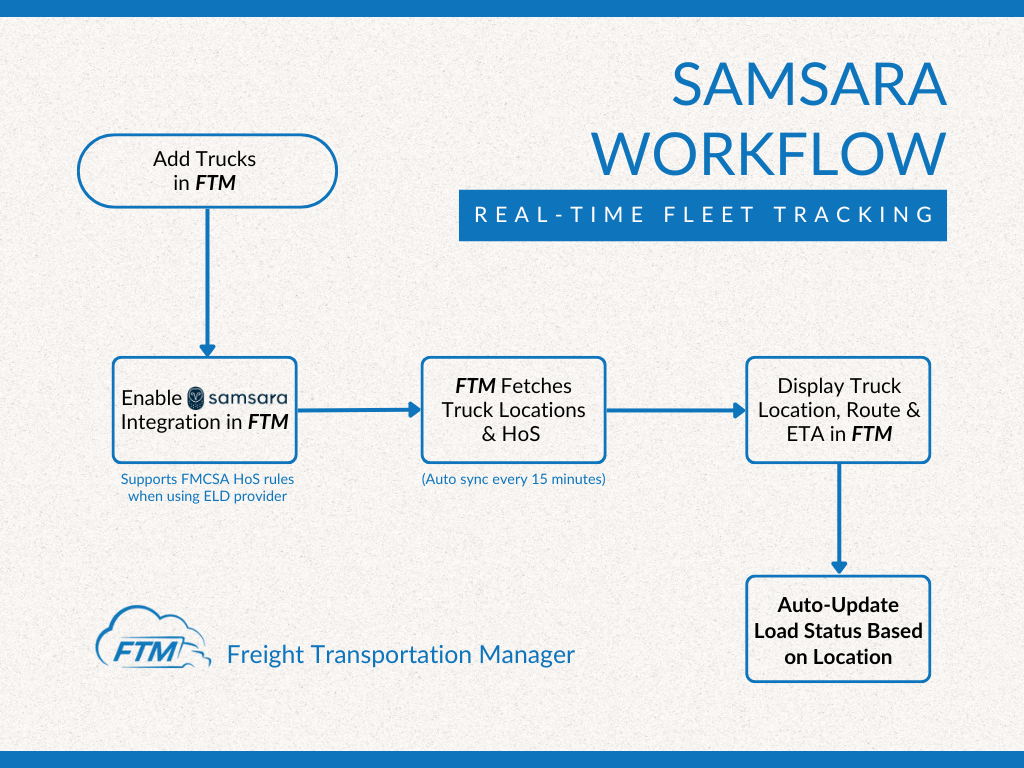
Samsara workflow connected to FTM transportation operations
Example Samsara workflow inside FTM, connecting fleet and vehicle data to transportation operations.
Operational automation

Geofencing And Operational Automation

Use real-time vehicle location data to automate transportation workflows when vehicles arrive, depart, or enter predefined locations.

Samsara Event
FTM Action
Arrive At Pickup
Shipment status updated, dispatch notified
Depart Pickup
Transit workflow begins, customer visibility opens
Arrive At Delivery
Customer notified, delivery milestone recorded
Depart Delivery
Billing workflow triggered, POD collection begins

Vehicle location data becomes more valuable when it creates action. FTM helps transportation teams use vehicle location and geofence events to automate dispatch workflows, customer communication, and transportation operations.

When telematics access is limited

Visibility Beyond Telematics Access

Many brokers and shippers move freight through carriers whose telematics systems are outside their control. FTM provides an additional visibility option when direct telematics access is unavailable.

When Samsara Is Available
Full fleet visibility
Real-time vehicle location, driver activity, safety events, asset tracking, and fleet diagnostics flow directly from Samsara into FTM load records, dispatch workflows, and reporting.
When Telematics Access Is Unavailable
Driver location requests
When a carrier manages their own telematics system outside your control, FTM can send a location request directly to the driver. The driver shares position through a mobile browser. Location returns to the Dispatch Console without requiring telematics integration.
Samsara Data
Driver Location Request
FTM Dispatch Console

Both paths return location data to the same Dispatch Console. The choice of method depends on which carriers are on which loads, not on a fixed integration requirement.

Operational outcomes

What This Enables

Connecting fleet telematics data to FTM produces outcomes that neither platform creates independently.

Location Tied To The Load
Vehicle position appears against the load it belongs to inside FTM, not just as a dot on a fleet map.
Customer Visibility From Fleet Data
Shipment status on the Customer Portal can reflect actual vehicle position from your telematics platform rather than manual status updates.
Dispatch Decisions Based On Live Vehicle Status
Dispatch teams see which vehicles are available, in transit, or flagged without switching between platforms.
Driver And Asset Visibility
Driver activity, safety events, and asset location from your fleet platform connect to carrier and load records inside FTM.
Operational Reporting Connected To Fleet Data
Fleet performance appears in the same Salesforce dashboards used for operational and financial reporting.
Reduced Check Calls
Dispatch teams see live fleet status without switching platforms. Customers see shipment progress on the portal. Fewer interruptions for everyone.
Where the data lives

One Salesforce Record, Multiple Data Sources

Vehicle data, driver activity, load records, customer records, dispatch activity, reporting, and financial visibility remain connected inside the same Salesforce-native transportation platform.

FTM runs natively on Salesforce. Not integrated with Salesforce. Not synced to Salesforce. Built inside the Salesforce data model, so every load record, carrier record, customer record, and fleet data point lives in the same environment your CRM, reporting, and business workflows already use.

A load record in FTM is the convergence point for fleet telematics data, driver status, customer expectations, carrier relationships, and financial records inside a single Salesforce environment.

Fleet platforms know what vehicles are doing. FTM connects that to everything the business needs to know about each load those vehicles are carrying.

Salesforce-native, not a separate fleet system
Load Record
Vehicle
Real-time location and fleet status
Driver
Activity, HOS, and safety events
Asset
Tracked and linked to the load
Carrier
Linked to the vehicle and driver
Customer
Visible on the Customer Portal
Status Updates
Automated from geofence events
Geofence Events
Recorded against the load record
Reporting
Fleet and operational data together
Salesforce-Native Does Not Mean Salesforce Required
Salesforce platform can be included as part of the FTM implementation. Existing Salesforce licenses are not required. Organizations can deploy FTM inside an existing Salesforce environment or launch with Salesforce provisioned as part of implementation.
Customer visibility

Fleet Visibility Meets Customer Visibility

Vehicle location data becomes more valuable when customers can see shipment progress. The fleet platform knows where the vehicle is. FTM connects that to the Customer Portal.

Samsara
Real-time vehicle position
FTM Load Record
Location tied to the shipment
Customer Portal
Live shipment status and visibility
Customer
Sees progress without calling dispatch

Without this connection, customers call dispatch to ask where their shipment is. A dispatcher checks the fleet platform, finds the vehicle, estimates an arrival time, and updates the customer manually.

With fleet data connected to FTM, the Customer Portal can surface actual vehicle position automatically. The customer sees real shipment progress. The dispatcher stays focused on exceptions rather than status calls.

This helps reduce check calls and improve customer communication without adding work to the dispatch team.

Executive visibility

Operational Impact

Connecting fleet data to transportation operations produces measurable outcomes for dispatch teams, customers, and leadership.

Faster Exception Response
Delayed shipments are identified earlier when vehicle location connects to load records and dispatch workflows automatically.
Fewer Manual Check Calls
Automated location updates from geofence events and fleet data reduce the volume of manual status calls dispatchers handle each day.
Better Customer Visibility
Customers see real shipment progress on the Customer Portal. Fewer inbound status requests and a stronger overall service experience.
Samsara Integration FAQ

Questions teams ask before connecting Samsara.

For questions specific to your fleet configuration, a transportation specialist can walk through your use case.

Why integrate Samsara with FTM?
+
Samsara provides real-time fleet, driver, and asset visibility. FTM connects that data to transportation workflows, dispatch decisions, customer updates, and reporting inside Salesforce, turning telematics data into operational intelligence.
How can Samsara data improve transportation visibility?
+
Vehicle location and driver activity from Samsara can connect to load records, carrier records, dispatch workflows, and the Customer Portal inside FTM. This reduces manual status updates and keeps operational data connected to business records.
Can Samsara location events trigger workflow automation?
+
Yes. Real-time location and geofence events can support status updates, dispatch workflows, customer visibility, and reporting inside FTM without requiring manual intervention at each step.
Does FTM replace Samsara?
+
No. Samsara remains the telematics, fleet management, and vehicle data source. FTM connects that data to transportation operations and business workflows inside Salesforce.
Do we need Salesforce before implementing FTM?
+
No. Salesforce platform can be included as part of the FTM implementation. Existing Salesforce licenses are not required. Organizations can deploy FTM inside an existing Salesforce environment or launch with Salesforce provisioned as part of implementation.
Can FTM support visibility when telematics access is unavailable?
+
Yes. When a carrier manages their own telematics system, FTM can send location requests directly to drivers as an additional visibility option. Location returns to the Dispatch Console without requiring telematics integration.
Get started

Turn Fleet Data Into Transportation Visibility.

See how Samsara data can power dispatch workflows, customer visibility, geofencing, reporting, and transportation operations inside FTM.

Go live in as little as 14 days  ·  No long-term contract required

Let's Talk!

Thanks for stopping by! We're here to help, please don't hesitate to reach out.

Watch 3-Min Demo