A TMS implementation timeline can run anywhere from a few weeks to well over a year.
On this page
That range sounds unhelpfully broad until you separate the software installation from everything surrounding it.
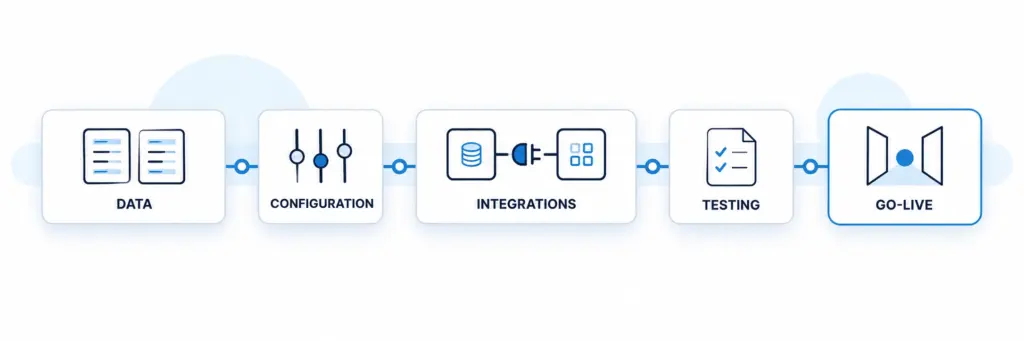
Modern cloud software can provision an environment quickly. However, transportation teams still need to migrate customer and carrier data, configure workflows, connect accounting or ERP systems, test rates and documents, train users, and decide how active freight will move from the old system to the new one.
Consequently, the real question is not simply, “How long does a TMS take to install?”
It is:
How long until our team can safely run real freight, bill it correctly, and stop depending on the old system?
Current vendor guidance illustrates the range. Shipwell says many implementations span about 12–14 weeks, with integration complexity and resource availability affecting the schedule. Descartes says focused implementations can take months, while large global deployments may run longer than a year.
FTM takes a narrower configuration-first approach: agreed core workflows can go live in as little as 14 days when scope, data, integrations, and team availability align. Larger multi-entity or custom deployments may use phases instead.
What Is a Realistic TMS Implementation Timeline?
There is no useful universal number.
Instead, think about implementation in three patterns.
Focused cloud rollout
A tightly scoped operation with clean data, standard workflows, and a few existing integrations can move quickly.
The first production scope might include:
- Users and permissions
- Customers and carriers
- Core load workflow
- Dispatch
- Documents
- Basic billing
- Essential integrations
- Standard reporting
In this situation, the goal is not to recreate every historical customization before go-live.
Instead, teams launch the workflows needed to move freight safely, then expand.
Mid-market transformation
A larger carrier, broker, or shipper may need ERP or accounting integration, multiple departments, customer-specific billing rules, reporting, portals, and historical migration.
As a result, testing and stakeholder coordination often consume more time than software configuration.
Enterprise rollout
Multi-country entities, multiple ERPs, extensive EDI, custom integrations, regulatory requirements, and large user populations can turn implementation into a broader transformation program.
In that case, a phased deployment usually makes more sense than one giant cutover.
Why the TMS Implementation Timeline Changes So Much
The vendor matters, but your operating environment matters just as much.
Data quality
Dirty data can slow an otherwise simple project immediately.
Duplicate customers, outdated carriers, inconsistent location names, incomplete rate tables, and missing equipment records all require decisions before migration.
Therefore, clean the data before the implementation clock starts whenever possible.
Integration scope
One accounting connector is different from connecting:
- ERP
- Accounting
- ELD or telematics
- Load boards
- Carrier compliance
- Visibility platforms
- Customer portals
- EDI partners
- Custom internal applications
Each additional system introduces authentication, field mapping, testing, ownership, and failure-recovery questions.
That is why FTM recommends identifying the required technology stack before deployment through its TMS integration ecosystem. FTM currently documents more than 46 transportation integration paths.
A TMS Implementation Timeline Should Start Before the Contract
Fast implementation rarely comes from rushing.
It usually comes from removing unanswered questions before kickoff.
Before signing, document:
- Which workflows belong in phase one
- Which data must migrate
- Which historical data can remain archived
- Which integrations are mandatory for go-live
- Which reports leadership needs immediately
- Who approves configuration decisions
- Which users need training
- What success looks like on day one
In addition, assign one internal owner with enough authority to make decisions.
Projects stall when every field mapping, workflow rule, and reporting question waits for another committee meeting.
If you are still evaluating systems, FTM’s TMS demo testing guide explains how to test real workflows before implementation begins.
TMS Implementation Timeline by Phase
A useful project plan follows operational milestones rather than arbitrary calendar dates.
Phase 1: Discovery and scope
First, define what the first production release must accomplish.
Map order or load creation, quoting, carrier selection, dispatch, tracking, documents, billing, settlement, reporting, and exceptions.
However, avoid recreating every workaround from the old system.
A migration is an opportunity to remove operational debt, not automate it.
Phase 2: Environment and workflow configuration
Next, configure users, permissions, business entities, locations, statuses, approvals, document rules, and core workflows.
At this stage, operations should validate how the new process actually works.
Phase 3: Data migration
Then migrate the records required for production.
Depending on the operation, that may include customers, carriers, drivers, equipment, facilities, rates, lanes, contacts, open loads, and selected history.
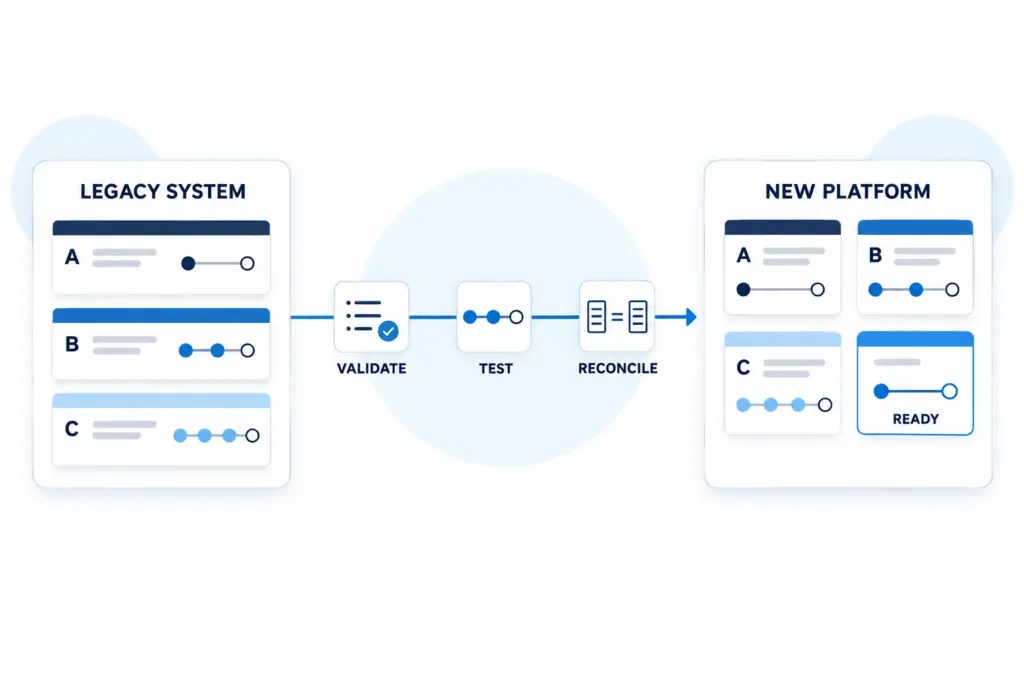
Most importantly, reconcile the migrated totals against the source.
Integrations Often Decide the Go-Live Date
Integration work deserves its own milestone.
The implementation team should connect each required system and test the actual end-to-end transaction.
For example, do not confirm that QuickBooks “connects.”
Create a representative load, complete the billing workflow, send the expected transaction, and verify the result on both sides.
Likewise, test what happens when the integration fails.
Does the system retry? Does someone receive an alert? Can operations see that finance never received the record?
Descartes’ current TMS implementation guidance similarly emphasizes connecting ERP/WMS systems and carriers, testing integrations, and establishing clear ownership before rollout.
Soft mid-article CTA
See how FTM connects a transportation stack: the FTM integrations hub shows the accounting, ERP, ELD, load-board, compliance, tracking, and related systems that can enter the implementation scope.
Testing Should Follow a Real Load From Start to Finish
A test environment full of perfect sample records creates false confidence.
Instead, use actual operating scenarios.
Run:
- A normal load
- A load with a carrier rejection
- A shipment with a changed rate
- An exception or delayed appointment
- A missing document
- An accessorial charge
- A corrected invoice
Then follow each transaction from entry through financial completion.
Meanwhile, finance should reconcile billing and carrier cost, operations should confirm status behavior, and administrators should verify permissions and reporting.
This stage frequently exposes problems that feature-level testing misses.
Training Should Happen Close to Go-Live
Training too early creates another problem: users forget the workflow before they use it.
Therefore, schedule role-specific sessions near production launch.
Dispatchers need different training from finance. Likewise, drivers, carrier representatives, managers, and Salesforce administrators should see only the workflows relevant to their responsibilities.
A good rollout also identifies several internal super users.
These people become the first line of support after launch and help distinguish a training question from a genuine configuration problem.
Should You Run the Old and New TMS in Parallel?
Sometimes.
However, parallel operation should reduce migration risk rather than become a permanent operating model.
For a complex financial transition, teams may want to reconcile invoices, settlements, or reporting between both systems before completing cutover.
By contrast, double-entering every load for weeks creates workload and introduces its own mistakes.
A cleaner strategy often works like this:
- Finish existing loads in the old TMS.
- Start new loads in the new TMS after a defined cutover point.
- Keep the old system available for reference.
- Reconcile critical financial outputs.
- Retire write access after confidence rises.
The exact approach depends on billing cycles, active freight, data portability, and operational risk.
What Makes a TMS Implementation Timeline Longer?
Several warning signs consistently expand scope.
Migrating everything
Years of obsolete loads and outdated master records may add work without adding operational value.
Instead, separate production data from historical archive data.
Customizing before users learn the standard workflow
Teams sometimes request dozens of changes before anyone has processed a real load.
Consequently, they reproduce old-system habits before understanding the new platform.
Adding integrations late
If accounting, ERP, telematics, or EDI becomes a surprise halfway through the project, the schedule changes.
Define the architecture during evaluation.
No decision owner
When every configuration choice waits for consensus, even simple projects slow down.
Give the project lead authority.
Treating training as the final checkbox
User adoption affects go-live readiness.
Therefore, include actual dispatchers, finance users, and operations staff throughout testing rather than introducing them on the final day.
How FTM’s TMS Implementation Timeline Works
FTM publishes a configuration-first rollout for agreed core workflows.
The current FTM platform overview breaks that implementation into four stages:
Kickoff | Days 1–3: Discovery, Salesforce environment setup, users, roles, and operating structure.
Build | Days 4–8: Data migration and configuration of the core transportation workflows.
Connect | Days 9–12: Required integrations are connected and tested with representative loads.
Launch | Days 13–14: Role-based training, final validation, and production go-live.
That 14-day target applies to aligned core scope, not every possible enterprise transformation.
FTM explicitly notes that data complexity, integrations, multi-entity structures, custom workflows, and larger deployments can require a phased plan.
This distinction matters.
A fast core launch can create value sooner without pretending that every future workflow must fit into the first two weeks.
TMS Implementation Timeline Comparison
| Implementation Pattern | Typical Scope | Main Timeline Drivers | Best Rollout Approach |
|---|---|---|---|
| Focused cloud rollout | Core users, clean data, standard workflows, limited integrations | Data readiness, user availability, connector setup | Launch core workflows first, then expand |
| Mid-market rollout | Multiple departments, ERP/accounting, portals, reporting | Integration testing, migration, workflow decisions, training | Structured implementation with UAT and staged cutover |
| Enterprise transformation | Multi-entity, multi-region, multiple ERPs, custom requirements | Governance, integration complexity, data, change management | Phased rollout by entity, region, workflow, or mode |
| FTM core deployment | Agreed core transportation workflows on Salesforce | Scope alignment, data, required integrations, team readiness | Target core go-live in as little as 14 days; phase broader scope |
There is no universal TMS implementation duration. Published vendor guidance ranges from weeks to more than a year depending on scope. FTM’s 14-day figure refers specifically to aligned core workflows.
How to Shorten a TMS Implementation Without Creating Risk
Speed should come from reducing complexity, not skipping controls.
Clean your data early
Do not spend kickoff week deciding whether 12 versions of the same customer should migrate.
Freeze phase-one scope
Create a backlog for useful improvements that do not block production.
Otherwise, every idea becomes a launch dependency.
Use proven integrations
Prebuilt connections generally remove discovery and development work.
Give users realistic tests
Real scenarios uncover workflow problems before real customers do.
Make decisions quickly
Finally, set response deadlines for project questions.
A vendor cannot finish configuration while waiting five days for an approval on every field, report, or workflow rule.
When Is a TMS Actually “Implemented”?
Go-live is not the finish line.
The stronger definition is:
The TMS is implemented when the team can operate, recover from exceptions, bill correctly, trust the reports, and manage the system without depending on the old workflow.
Therefore, review performance again after 30, 60, and 90 days.
Measure:
- Loads per user
- Manual touches
- Billing cycle time
- Error rate
- Carrier response
- Customer-service workload
- User adoption
- Integration failures
- Exception resolution time
If employees still export everything into spreadsheets, the project may technically be live while operational adoption remains unfinished.
TMS Implementation Checklist Before You Sign
Before committing to a vendor, confirm:
- Phase-one scope
- Named project owners
- Data migration responsibility
- Integration list
- Configuration responsibility
- Testing process
- Training plan
- Cutover strategy
- Historical data access
- Support after launch
- Acceptance criteria
- Timeline assumptions
- Additional implementation costs
Most importantly, ask the vendor what would make the proposed timeline slip.
The answer reveals whether the estimate reflects your environment or simply a standard sales number.
The TMS Implementation Timeline Is Really a Scope Decision
A long implementation does not automatically mean the software is bad.
Likewise, a fast implementation does not automatically mean the project is good.
The meaningful question is what has to happen before your operation can safely move real freight through the new platform.
A focused deployment may need only users, clean master data, core workflows, several integrations, testing, and training.
An enterprise transformation may involve multiple entities, data models, ERP systems, approval structures, customer connections, and regional rollouts.
Therefore, compare vendors using the same implementation scope.
FTM’s architecture can reduce part of that workload because the TMS runs natively on Salesforce and uses the same platform for users, permissions, automation, reporting, and transportation records. That lets its implementation team treat many deployments as configuration projects rather than building a separate CRM-to-TMS layer.
The fastest migration is not the one that reaches a date on the calendar first.
It is the one that reaches production without leaving your team with months of cleanup afterward.
Frequently Asked Questions
See What Your TMS Rollout Would Actually Require
Bring your current TMS, integrations, data requirements, users, and core workflows. FTM will map the implementation scope and show which transportation workflows can move first.
Review Your Implementation Plan